

Games Like Low’s Adventures






Shutter Story
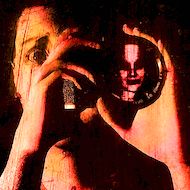
Shutter Story looks like a quiet photo-editing task, but every image can become evidence in a disturbing family mystery. Your friend Eli believes his family is being haunted, and he needs help convincing his parents that the strange details in their photographs are real. You work at a computer using SpectralAware 2.1, adjusting images and videos until hidden shapes or unusual details become visible. The game then takes you away from the screen and into Eli’s house, where the investigation begins to feel much less safe.
| Genre | Psychological horror, mystery, first-person investigation |
| Platform | Windows PC |
| Core mechanic | Inspect photos and videos, reveal anomalies, and classify each finding |
| Evidence categories | Apparitions, Simulacra, Strange Lights, Demonic Entities, and other paranormal signs |
| Structure | Photo and video investigations mixed with first-person house exploration |
Reading the Evidence in Shutter Story
The central loop is simple to describe but takes patience to do well: open a family photograph or home video, adjust the image, identify anything unusual, and choose the category that best matches the evidence. SpectralAware 2.1 lets you change exposure, contrast, and noise, then apply filters to bring faint details forward. A dark corner may hide a shape that is easy to miss at normal settings, while pushing the image too far can make ordinary visual noise look suspicious. The aim is not to make every picture look frightening; it is to find details that support a specific classification.
Start by checking the whole frame before zooming in on one suspicious spot. Look at faces, windows, mirrors, background spaces, and the edges of the photograph, then compare what you see after each adjustment. The guidebook describes different haunting types, so use its examples instead of guessing from atmosphere alone. Players who enjoy detective work will appreciate the careful comparison, while anyone expecting constant chase sequences may find the measured pace surprisingly slow.
One detail that gives the investigation its rhythm is the shift between ordinary family images and the unsettling evidence hidden inside them. You can spend several moments adjusting a picture, convinced nothing is there, and then notice a figure in the background that changes how the entire scene reads. That small discovery is more important than simply making the image darker. In this game, a convincing clue is one you can explain and classify, not merely one that looks creepy.
Classifying Apparitions and Simulacra
Correct classification matters because the findings are connected to Eli’s family story, and mistakes can carry consequences. Apparitions, Simulacra, Strange Lights, and Demonic Entities are not interchangeable labels; the guidebook is there to help you distinguish the kinds of signs you have uncovered. When a shape appears in a reflection or blends into a photograph’s background, pause before deciding what it represents. A vague silhouette may look supernatural at first glance, but the category should fit the visual evidence rather than your first reaction.
Beginners often rush through the report because they think the task is just a hidden-object hunt. A better habit is to revisit the original image after adjusting it and check whether the suspected feature remains visible from more than one setting. Keep track of why you chose a label, especially when two categories seem plausible. Players who like methodical puzzles can treat each photograph as a small case file; players who prefer story-first horror should still take the classifications seriously because the narrative depends on them.
The feedback after an investigation helps you learn from missed or misidentified photographs without necessarily spelling out every haunting. Use that feedback to review your process, not simply to memorize a picture. The October 2026 demo update also adds an appendix with interactive examples for each haunting type, making the guidebook more useful when a category feels unclear. Even with those aids, some images can remain ambiguous, and that uncertainty is part of the tension rather than proof that every answer will feel obvious.
Exploring Eli’s House Between Investigations
Shutter Story breaks up desk work with first-person sections inside Eli’s home. The change in perspective matters: at the computer, you can examine evidence at your own pace, but the house places you inside the setting connected to those images. Lighting, environmental sounds, and small changes around familiar rooms make the supernatural problem feel immediate. Pay attention to the space instead of sprinting from one point to the next, because the house sections add context to what you have been studying.
Early in the game, the contrast between the computer’s orderly interface and the uneasy rooms helps establish the tone. Later, the family history becomes harder to separate from the apparent hauntings, and discoveries begin to feel connected across generations. There is no traditional sequence of numbered action levels to master; progression comes from investigating the supplied photographs and clips, then seeing how the evidence fits the wider story. The full game is described as containing more than 80 haunting photos and video clips, while the demo offers a smaller introductory selection.
The slow pace is one of the game’s most divisive qualities. Fans of atmospheric horror may enjoy having time to inspect a room and think about what a clue means, while players who want frequent scares can find the transitions deliberate. The house exploration is not just a break from photo editing: it shifts the question from whether a picture contains something strange to what that evidence means for Eli and his family.
Building a Reliable Investigation Routine
For a more consistent run, follow the same order with each piece of evidence: scan the full frame, inspect likely focal points, adjust exposure and contrast, test noise or filters, and compare the result with the guidebook. This routine reduces snap judgments and makes it easier to notice details that appear only after a careful adjustment. If a clue seems uncertain, return to the original image before submitting your classification. The game rewards attention and careful interpretation more than random experimentation with every available setting.
Advanced players can also connect separate discoveries instead of treating each photograph as an isolated puzzle. Keep the family relationships and the chronology in mind as you move through the material, because the mystery concerns a legacy passed between generations. A clue that seems minor on its own may take on a different meaning when it appears beside a related photograph or video. That approach suits players who enjoy piecing together narrative fragments and comparing evidence across several scenes.
Do not assume that maximum contrast always reveals the truth. Heavy adjustments can make texture and grain look like a face or figure, so compare several settings and look for a stable detail before committing to a label. The most useful skill is learning when to stop editing and make a reasoned decision. That restraint keeps the investigation grounded even when the images are designed to make you doubt what you are seeing.
Questions Players Ask About Shutter Story
How do you find hidden figures in Shutter Story photos?
Use SpectralAware 2.1 to adjust exposure, contrast, and noise, then try the available filters while checking the entire photograph. Focus on background areas, reflections, windows, and spaces around the people in the image rather than staring only at the center. Compare the altered image with the original so ordinary grain does not become a false clue.
How do you choose between Apparitions and Simulacra?
Consult the in-game guidebook and compare the visible evidence with its examples for Apparitions, Simulacra, Strange Lights, Demonic Entities, and other categories. Do not choose a label solely because a picture feels frightening; check the shape and context after making several image adjustments. If the evidence remains unclear, review the photograph again before submitting your answer.
What should you do during the first-person sections in Eli’s house?
Explore carefully and pay attention to changes in the rooms, lighting, and environmental details that connect the house to the photo investigations. These sections add present-day tension to the evidence you have classified at the computer. Remembering what you found in SpectralAware 2.1 can help the family mystery feel connected rather than like two unrelated gameplay modes.
Shutter Story works best when you treat SpectralAware 2.1 as an investigative tool instead of a button for making every image look sinister. Careful classifications of Apparitions and Simulacra, attention to the family photographs, and a willingness to explore Eli’s house slowly give the mystery room to unfold. The uncertainty can be frustrating when a clue is subtle, but that same doubt is what makes each convincing discovery feel earned.
There are no reviews yet. Be the first one to write one.